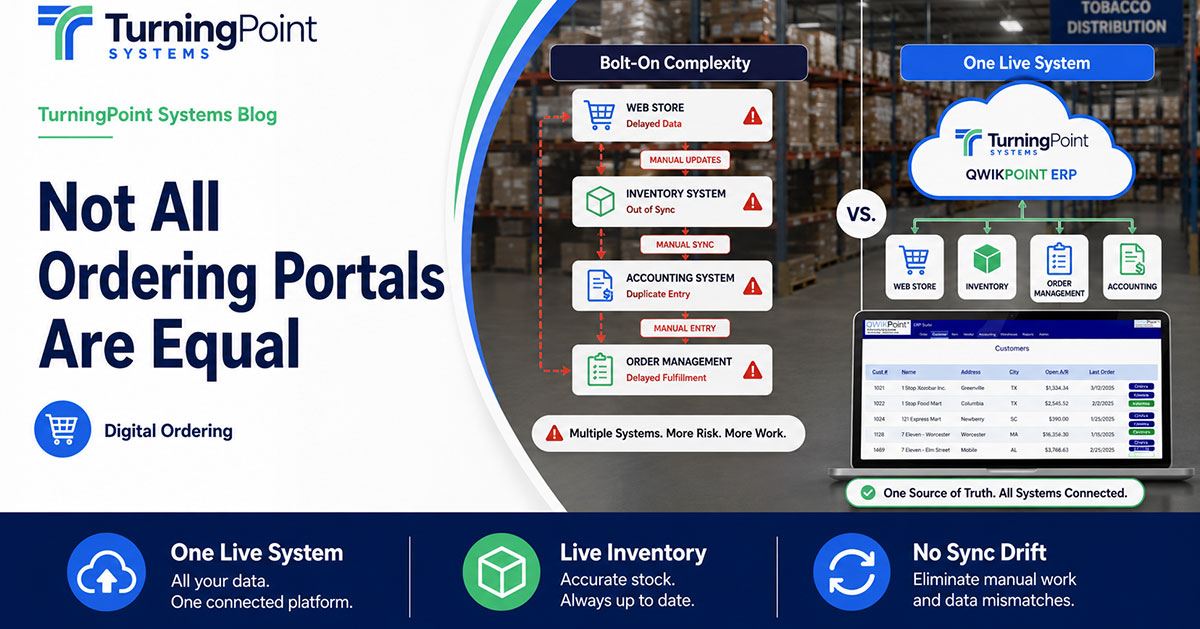
“We have an ordering portal” can mean three very different things — and the difference shows up in your customers’ orders. There are broadly three ways a distributor ends up with one.
Option A — the bolt-on
A separate ordering app from a third party that syncs to your system on a schedule. You now run two systems instead of one. The stock a customer sees is only as fresh as the last sync, prices can drift between systems, and someone is often re-keying or reconciling orders by hand. It looks modern on the surface and creates quiet work underneath.
Option B — the on-premise portal
A portal tied to a server sitting in your building. It can work, but “real time” only holds when everything is connected and healthy, the IT burden is yours, and every upgrade is a project. When the server has a bad day, so does your ordering.
Option C — cloud-native, built into the ERP
One system, one live set of numbers. The portal reads from the same record that runs your warehouse, inventory, and pricing, so the stock a customer sees is the stock your warehouse just scanned. There is nothing to sync because there are not two systems — there is one.
When you evaluate a portal, look past the screenshots and ask the architecture question: is this one live system, or two systems pretending to be one? Ask where the inventory the customer sees actually comes from, how often it updates, and what happens when a price changes. The answer tells you whether the portal will build trust with your customers or quietly erode it.
Common Questions
Ready to scale your distribution? Find all the answers here
What is the difference between a bolt-on and a cloud-native ordering portal?
expand_more
A bolt-on is a separate ordering app that syncs to your system on a schedule, so customers see stock only as fresh as the last sync. A cloud-native portal is built into the ERP — one live system, so the stock a customer sees is the stock your warehouse just scanned.
What should distributors look for in a B2B ordering app?
expand_more
Ask the architecture question: is it one live system, or two pretending to be one? Confirm where the inventory the customer sees comes from, how often it updates, and what happens when a price changes.
Download the Full Guide
Don't let manual reporting slow down your distribution growth. Access our expert guides.